WhatsApp API Solutions for Promoting Products with Carousel Templates

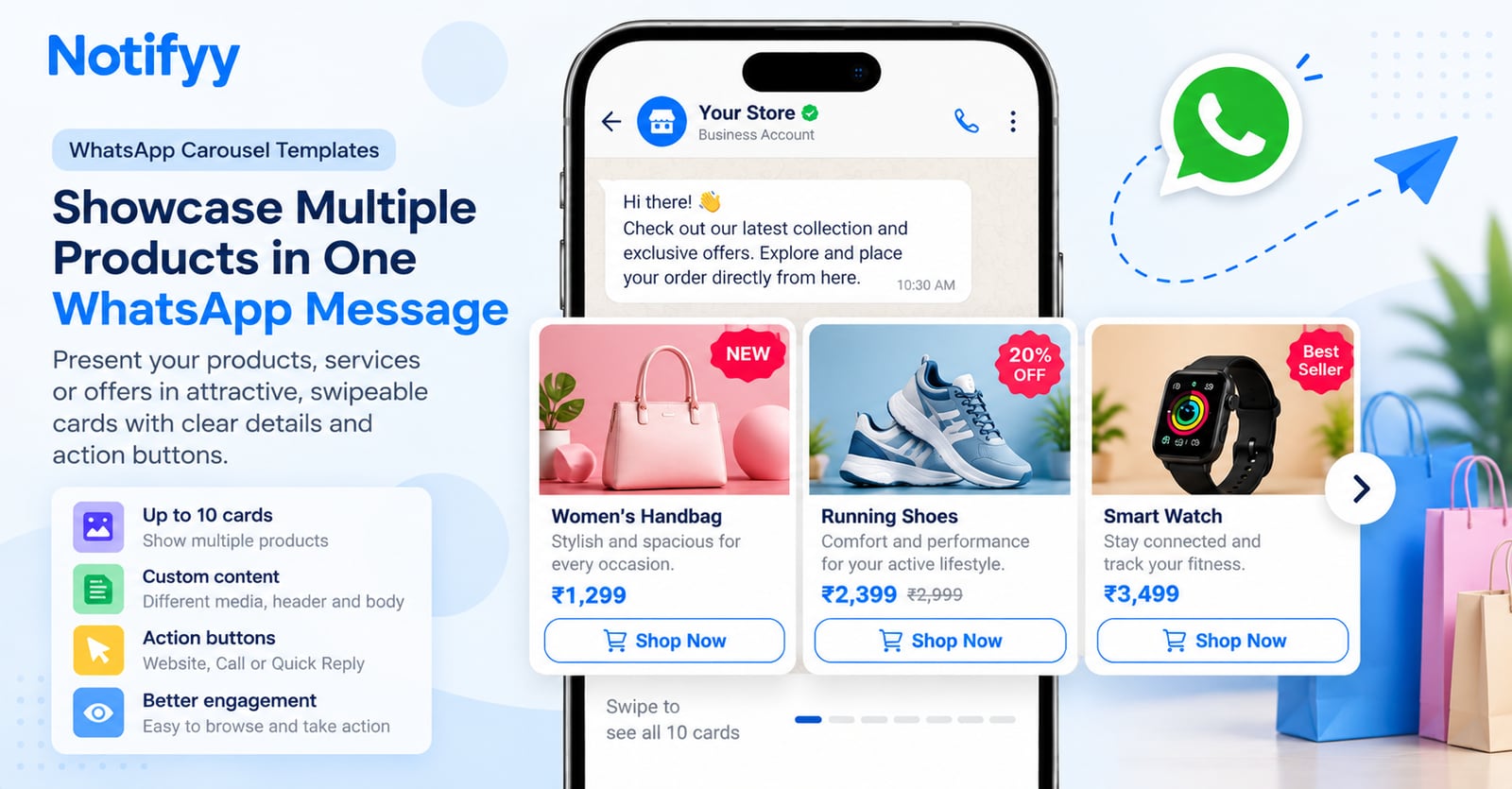
Promoting multiple products, property listings, or service packages through WhatsApp can be challenging. Long messages are difficult to browse, while sending a separate message for every item can clutter customers' chats.
WhatsApp Carousel Templates help solve this problem by displaying multiple products or offers as cards within a single marketing message. Each card can include its own image or video, description, and supported action buttons, allowing customers to browse options and choose what interests them.
With Notifyy, businesses can create carousel templates with up to 10 cards, customize each card's content, and add supported call-to-action or quick-reply buttons. This makes it easier to present products clearly, organize promotions, and guide customers towards the next step.
Carousel templates are one of the rich message formats available on the official WhatsApp Business API. As part of Notifyy WhatsApp API solutions, they work alongside campaigns, CRM segments, and WhatsApp automated messages, so your team can plan, send, and track product promotions from one platform.
1. Why Is It Difficult to Promote Multiple Products in One WhatsApp Message?
When a business has several products to show, it often has to choose between one long message and many separate messages. A long message can be hard to scan, while multiple messages may clutter the customer's chat and take more effort to manage.
WhatsApp Carousel Templates provide another option: one marketing message organized into individual cards. Each card gives a product or offer its own space, helping customers browse the options without reading a long block of text.
How Do WhatsApp Carousel Templates Help?
Each card can include its own image or video, header text, and body content. Customers move horizontally through the cards to view one item at a time. Notifyy supports up to 10 cards in a carousel template, helping businesses present a collection of related products or offers in one message.
2. How Can Carousel Cards Make Product Discovery Easier?
Customers often scan a promotion rather than read every line. A clear visual, short description, and consistent layout can help them understand what each item is and decide whether they want more information.
- Visual first: Use a relevant image or video so customers can see the product before reading the details.
- One item at a time: Keep each card focused on one product, service, or offer.
- Consistent layout: Use a similar structure across cards so details are easy to find.
- Less chat clutter: Present related options together instead of sending a separate promotional message for every item.
How Does Notifyy Help Organize Your Offers?
Notifyy lets you customize each card's media, header, and body text. Keep the wording concise and highlight the most useful details, such as a product name, price, or key benefit. Use clear button labels to show customers what they can do next.
3. Can Each Carousel Card Promote a Different Product or Service?
Yes. Each card can present a different product, service, package, or listing within the same carousel message. This can be useful for businesses that want to show related options together.
Examples Across Industries
- E-commerce: Showcase bestsellers, new arrivals, or a product collection.
- Retail: Present seasonal collections, special offers, or in-store promotions.
- Real estate: Display property listings with a photo and key details on each card.
- Travel and hospitality: Highlight holiday packages, destinations, or room types.
- Service businesses: Present different service packages or pricing tiers.
- Events: Promote events, workshops, or sessions in one message.
Important: Keep the media type consistent across the carousel. Use images or videos, but do not mix image cards and video cards in the same carousel.
4. How Can Buttons Help Customers Take the Next Step?
Showing a product is only part of the promotion. Customers may also need a simple way to visit a product page, call your business, or send a quick reply. Clear buttons make the next step easier to understand.
How Does Notifyy Support Carousel Buttons?
Notifyy supports up to two buttons per card. Depending on the configured button type, options include Call-to-Action buttons for Visit Website or Call, and Quick Reply buttons that let customers select a configured response.
Use clear labels such as “View Details,” “Explore Products,” or “Contact Us,” where supported. Check that each button leads to the intended destination or response and follows applicable WhatsApp requirements.
5. What Are Practical Examples of Carousel Campaigns?
A carousel can be structured around one clear campaign goal. For example:
- Fashion store: Use five cards for new arrivals, with a product photo, name, price, and a “View Details” button.
- Real estate agency: Use four cards for property listings, each showing a property photo, location, key features, and a call button.
- Salon or wellness studio: Use three cards for service packages, each with a short description and a quick-reply option.
- Event organizer: Use cards for upcoming sessions, with a banner image, session details, and a registration link.
The key is to give each card one clear purpose, use media that matches the content, and provide an obvious next step.
6. How Do You Create a WhatsApp Carousel Template in Notifyy?
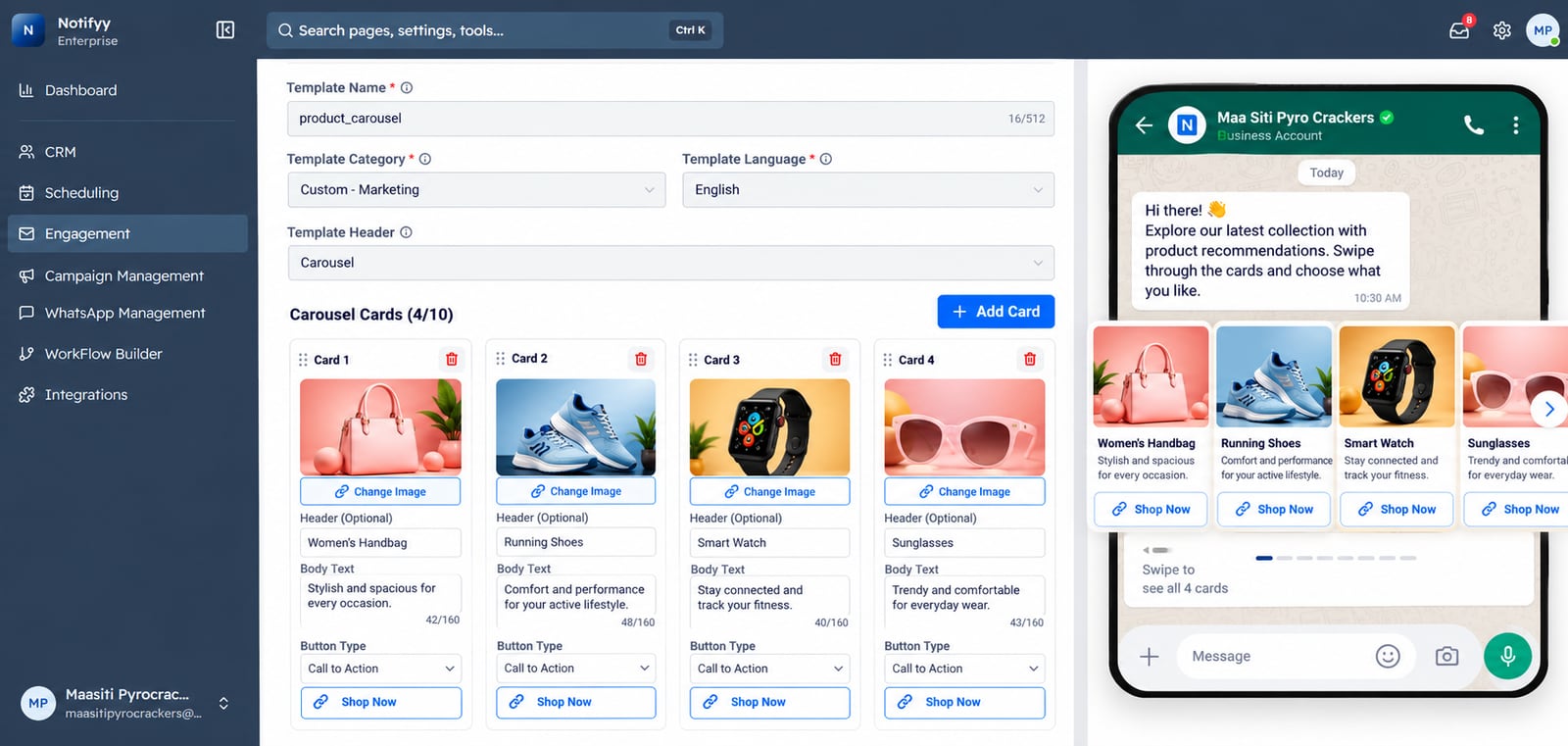
Follow the steps below to create a WhatsApp carousel template in Notifyy.
Choose the Marketing category
In the WhatsApp template builder, choose the Marketing template category. Carousel templates are not supported under Utility or Authentication.
Select the carousel format
Select Carousel as the template header format when creating a new template.
Choose one media type
Use either images or videos for the entire carousel. Image cards and video cards cannot be mixed in the same carousel.
Add your cards
Add up to 10 cards and provide the media, header text, and body text for each item.
Configure the buttons
Configure up to two supported buttons per card, using Call-to-Action or Quick Reply options.
Review and submit for approval
Review the card content, media, and buttons, then submit the template for WhatsApp approval.
Send it in a campaign
After approval, use the template in a campaign and send it to the appropriate audience.
Because carousel templates are sent through Notifyy campaigns, they follow the same workflow as other bulk WhatsApp messaging software: choose a segment or individual contacts, preview the audience, send immediately or schedule for later, and then review delivery and read rates in campaign insights.
7. Best Practices for Better Carousel Campaigns
- Lead with your strongest card: Put the most relevant or popular item first.
- Keep each card focused: Use one product, one key message, and one next step.
- Use high-quality media: Keep images consistent in quality and presentation.
- Write concise text: Highlight essential details and avoid long descriptions.
- Use clear button labels: Tell customers what will happen when they tap.
- Plan the card order: Arrange products by relevance, popularity, or price.
- Check approval requirements: Review content and formatting before submitting the template.
- Choose the right audience: Send relevant promotions to customers who are eligible to receive them.
Conclusion: Promote More Products in One Organized Message
Promoting several products on WhatsApp does not have to mean writing long messages or sending a separate message for every item. Carousel templates organize products into individual cards, each with its own media, content, and supported buttons.
With Notifyy, businesses can create carousel templates with up to 10 cards and customize each card to present a product, service, or offer clearly. Use suitable media, concise descriptions, relevant buttons, and the required WhatsApp approval process to give customers a simpler way to explore your offerings.
If you are evaluating WhatsApp messaging software for product promotions, carousel templates give your team a clear, visual way to present more of what you sell in a single conversation.
Ready to grow your sales with WhatsApp?
Start managing contacts, running campaigns, and automating workflows from one platform.